
Guide
How to take notes while driving
Short answer
To take notes while driving, use your voice only. Start the note with Siri or a single tap in CarPlay, say what you need, and let the app stop and save it on its own. Never type or read while moving. Free options are Siri reminders and Apple Voice Memos. A CarPlay notes app like RoadNotes does it all hands-free and turns it into text.
What is the safest way to take notes while driving?
The safest note is the one you don't take. The Governors Highway Safety Association tells drivers not to use phones or other devices while driving at all, whatever the law says. If a thought can wait, let it wait.
If it can't wait, a good method follows five rules:
- Voice only. No typing, no reading, no scrolling. Apple's own safety notes say to avoid typing a text message while driving.
- Starts without looking. One spoken command, a steering-wheel button, or a single large button you set up before you leave.
- Stops by itself. When you go quiet, the note should save. You shouldn't need to find a Stop button.
- Tells you it worked. A spoken or felt confirmation, so you never glance down to check.
- Read it later. Review, edit and share only after you park.
Set everything up at home: install the app, allow the microphone, and record one test note. Then the car is only for talking.
Which hands-free ways to take notes in the car are there?
1. Siri and Reminders (free, built in)
Hold the voice command button on your steering wheel, or say “Hey Siri” in cars that support it, and say something like “Remind me to call Dana tomorrow at nine.” Apple lists Reminders among the apps Siri can use in CarPlay, and in cars without CarPlay, Siri Eyes Free works over Bluetooth. This is best for one-line to-dos. It is not great for a longer thought. See how to use Siri to take notes while driving.
2. Apple Voice Memos (free, but not hands-free)
Voice Memos records as long as you like and can show a transcript. But you tap to record and tap to stop on the iPhone, so it needs your hands and eyes. Use it before you set off or after you park. See how to turn a voice memo into text.
3. Dictation into Notes (not for driving)
Dictation types what you say into any text field. It runs on the iPhone and stops after 30 seconds of silence. But you have to open a note and tap the microphone first, which means looking at the phone. Save it for when you're parked.
4. A CarPlay voice notes app
Some apps are built for this job. They show up on the CarPlay screen, start listening at once, and save the note when you stop talking. RoadNotes is one; others are compared in the best CarPlay apps for notes.
5. Apple Watch
If your car has no CarPlay, a watch app can be the next best thing. In RoadNotes on Apple Watch you tap New note and talk. The iPhone turns it into text, and your wrist taps when it's saved.
How do I take notes while driving with RoadNotes?
Before you drive (once):
- Install RoadNotes on an iPhone with iOS 26.4 or later and open it once.
- Record a test note at home. iOS asks for the microphone, and the first recording downloads the speech model that RoadNotes uses to turn speech into text on your iPhone.
- Pick your settings. Choose how long a pause ends a note (5 to 60 seconds). Turn on Add to-dos to Reminders if you want your to-dos in Apple Reminders.
In the car:
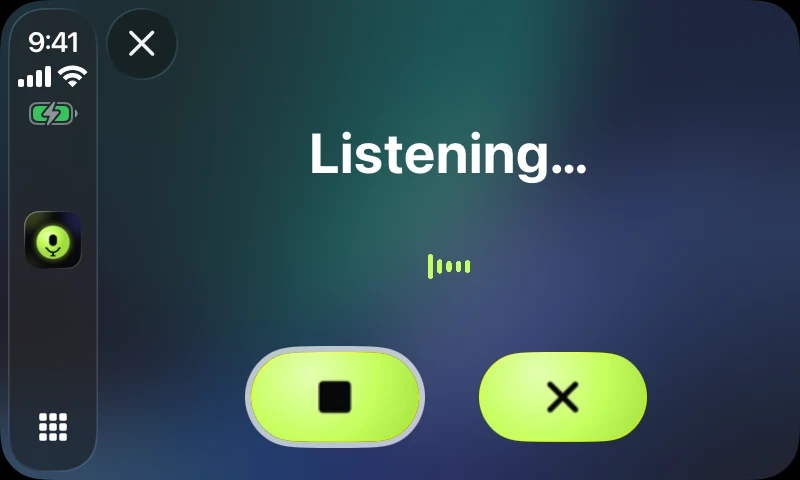
- Open RoadNotes on the CarPlay screen, or say “Hey Siri, open Road Notes”. It's already listening. There are no menus.
- Talk. Say it the way you'd tell a colleague: “Call Dana about Friday's delivery tomorrow at nine.”
- Go quiet, or tap Stop. RoadNotes saves the note when you stop talking and says out loud that it's saved.
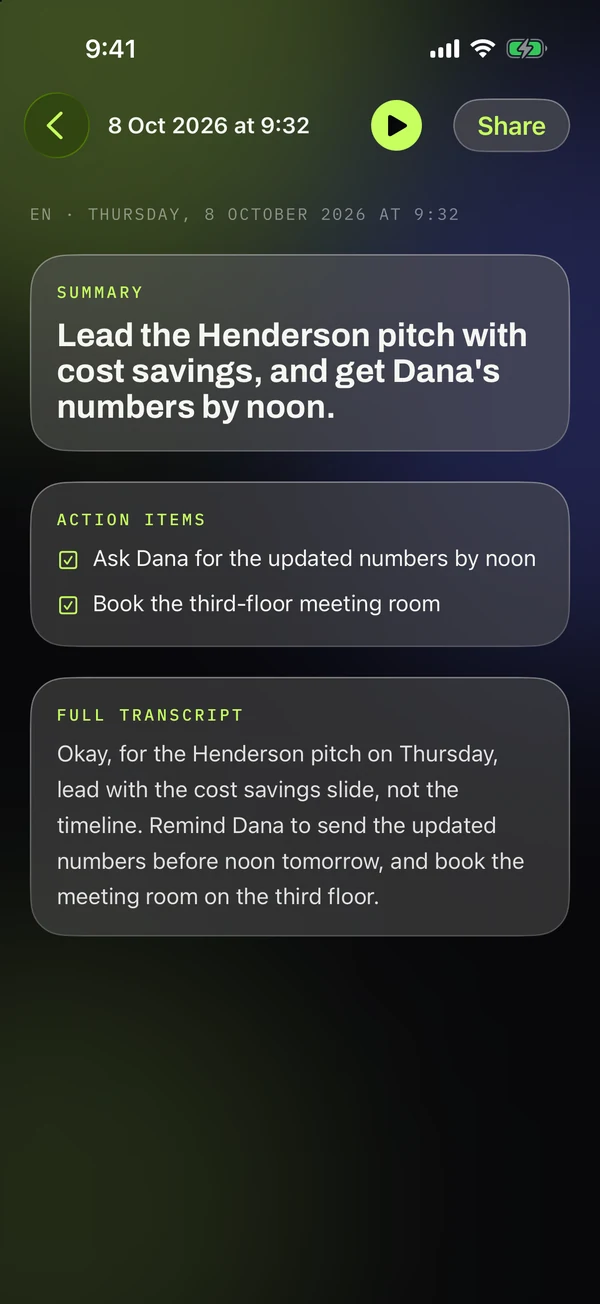
- Read it when you park. On your iPhone you get a short summary, the to-dos as a checklist and the full transcript. Summaries and to-dos use Apple Intelligence; without it, you still get the full transcript.
No CarPlay? The same note works with Siri, even with the iPhone locked (it shows a Live Activity on the Lock Screen), or from Apple Watch.
How do the ways to take notes while driving compare?
| Feature | RoadNotes | Apple Voice Memos | Notes dictation | Recorder apps |
|---|---|---|---|---|
| How you start | One tap in CarPlay, or Siri | Tap Record on iPhone | Open a note, tap the mic | Varies |
| On the CarPlay screen | Yes | No | No | A few (check the listing) |
| Stops by itself | After 5 to 60 s of quiet | No, tap Stop | After 30 s of quiet | Some |
| Confirms without a look | Says “saved” out loud | No | No | Varies |
| Transcript | About 100 languages | 10 languages, iPhone 12 or later | Text as you speak | Varies |
| Summary and to-dos | Automatic, with Apple Intelligence | Summary by tap with Writing Tools (Apple Intelligence) | No | Varies |
| Keeps the audio | No, deleted after transcription | Yes | No audio | Usually |
| Price | Free 10 days, then $9.99 once | Free, built in | Free, built in | Varies |
Apple facts from Apple's iPhone User Guide: Voice Memos recording, Voice Memos transcripts, Dictation. Checked November 24, 2026.
The short version: Siri reminders are fine for a quick to-do. For anything longer, you want an app that never asks you to look, which is what a CarPlay notes app is for.
Is it legal to take notes while driving?
It depends on where you drive, and this isn't legal advice. In the US, the GHSA reports that 33 states, D.C. and several territories ban all drivers from using a handheld phone, and 49 states ban texting for all drivers. No state bans all phone use for all drivers, but 36 states and D.C. ban it for new drivers.
Typing a note on a phone in your hand looks a lot like texting. Speaking to a mounted phone or to CarPlay is much closer to what hands-free laws allow. Check the rules for your state or country, and if your method needs your hands, pull over.
Turn on the Driving Focus. iPhone can silence notifications while you drive and turn on by itself when it connects to CarPlay or your car's Bluetooth. Apple notes that it is not a substitute for following distracted-driving rules.
How do I make notes I'll actually use later?
- Lead with the action. “Call Dana” beats “So I was thinking about Dana.”
- Say the when. “Tomorrow at nine” or “before noon.” RoadNotes uses the time you say when it adds a to-do to Reminders.
- One topic per note. Short notes are easier to find, share and act on.
- Spell names that matter. Speech recognition can miss unusual names. Check them when you read the note.
- Pause to finish. With auto-stop, silence is your Save button.
Frequently asked questions
What is the best way to take notes while driving?
Use your voice only. Start with Siri or one tap on the CarPlay screen, talk, and let the app save the note when you go quiet. RoadNotes is built for exactly this: it opens in CarPlay already listening, says out loud when the note is saved, and turns it into a summary and to-do list on your iPhone.
Can I take notes in CarPlay without an app?
Yes, as reminders. Apple lists Reminders among the apps Siri can use in CarPlay, so you can say “Remind me to call Dana tomorrow at nine.” For longer notes you need a voice notes app with CarPlay support.
Can I use Voice Memos while driving?
Not hands-free. Voice Memos starts and stops with a tap on the iPhone screen. It's great for recording before or after a drive, and it can show a transcript in 10 languages on iPhone 12 or later.
Do I have to look at the screen with RoadNotes?
No. RoadNotes opens listening, stops when you go quiet (after 5 to 60 seconds, as you choose) and says out loud that the note is saved. You read the note after you park.
Does RoadNotes send my voice to a server?
No. RoadNotes turns speech into text on your iPhone and deletes the recording right after. The first recording downloads the speech model; it contains no audio. Notes sync only through your private iCloud.
Does RoadNotes work on Android?
No. RoadNotes is an iPhone app for CarPlay, iPhone and Apple Watch. It needs iOS 26.4 or later.
How much does RoadNotes cost?
It's free for 10 days with every feature, then a one-time $9.99 unlocks it for life. There's no subscription, and nothing is charged automatically.
Try RoadNotes free for 10 days
Hands-free voice notes for CarPlay, iPhone and Apple Watch. Then $9.99 once. No subscription, no account.
More guides
Sources
Checked on November 24, 2026. Apple's guides describe the current iOS version and can change.
- Governors Highway Safety Association (GHSA): Distracted Driving
- Apple, iPhone User Guide: Important safety information for iPhone
- Apple, iPhone User Guide: Use Siri in your car on iPhone
- Apple, iPhone User Guide: Use other apps with CarPlay
- Apple, iPhone User Guide: Make a recording in Voice Memos on iPhone
- Apple, iPhone User Guide: View a Voice Memos transcription on iPhone
- Apple, iPhone User Guide: Dictate text on iPhone
- Apple, iPhone User Guide: Stay focused while driving with iPhone