
Guide · Siri
How to use Siri to take notes while driving
Short answer
Hold the voice button on your steering wheel, or say “Hey Siri” if your car supports it, and say what to remember: “Remind me to call Dana tomorrow at nine.” Siri saves it in Reminders, which Apple lists as a CarPlay app. For a longer note, say “Hey Siri, open Road Notes” and just talk. RoadNotes saves it when you go quiet.
How do I start Siri in the car?
Apple's guide to Siri in the car gives three ways:
- The steering wheel. Press and hold the voice command button until Siri beeps.
- The CarPlay screen. Touch and hold the Dashboard or Home button on the CarPlay Home Screen.
- Your voice. Say “Hey Siri” in cars that support it.
Apple has a useful tip: instead of waiting for Siri to notice that you stopped talking, keep holding the steering-wheel button while you speak and let go when you're done. That helps with longer reminders.
No CarPlay? Many cars have Siri Eyes Free, which connects Siri to the car over Bluetooth. You start it the same way, with the voice button on the wheel.
What can Siri save for me while I drive?
Apple says you can use Siri with CarPlay to reach many iPhone apps, including Reminders, Clock and Weather. For notes, Reminders is the useful one. Phrases from Apple's own Siri examples work well in the car:
- “Remind me to pack an umbrella when I get home.” (a reminder tied to a place)
- “Add artichokes to my groceries list.” (an item on a list)
- “Remind me to call Dana tomorrow at nine.” (a reminder with a time)
Each one becomes a single reminder. It's quick and free, and it's perfect for to-dos.
Can Siri write in Apple Notes while I drive?
Apple doesn't say so. Its CarPlay guide names Reminders, Clock and Weather as examples of apps Siri can reach in the car, and Notes isn't among them (checked November 24, 2026). Apple's Siri page does say Siri can pull up details from a note you saved, but that's for reading, not writing, and reading isn't something to do at the wheel.
If you rely on Notes, try your request while parked before you count on it on the road. For thoughts longer than one line, a reminder is a poor fit anyway: you lose the context. That's where a voice notes app comes in.
How do I take a longer note with Siri and RoadNotes?
RoadNotes adds its own Siri commands. You don't set anything up: they work once the app is installed, and they're listed in the app's Settings.
| Say | What happens |
|---|---|
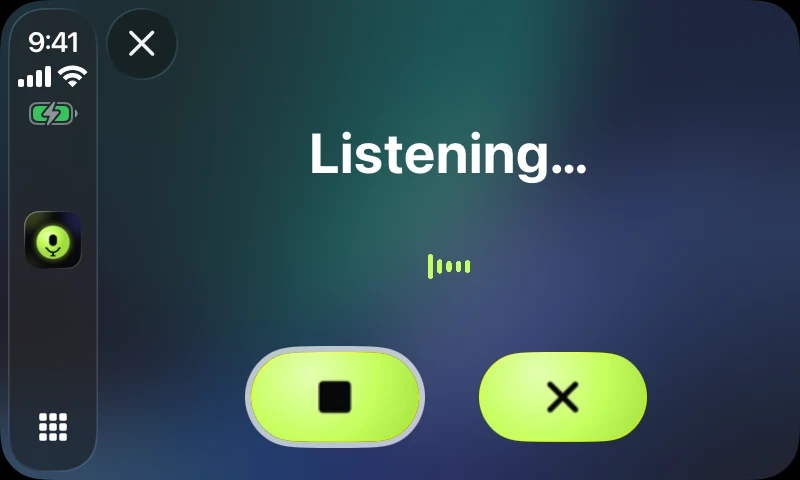
| “Hey Siri, open Road Notes” | In the car, CarPlay opens RoadNotes already listening. Just talk. |
| “Start a new note in RoadNotes” | Starts recording, even with the iPhone locked. A Live Activity on the Lock Screen shows a timer and a Stop button. “Take a note with RoadNotes” and “Record a note in RoadNotes” work too. |
| “Stop recording in RoadNotes” | Saves the note. “Save the note in RoadNotes” works too. Or just go quiet: auto-stop saves it after the pause you chose (5 to 60 seconds). |
| “Delete the last note in RoadNotes” | Asks first, then deletes your newest note. Said while recording, it throws that recording away. |
Say the name as two words, “Road Notes”, when you ask Siri to open the app. After you park, the note is on your iPhone as a summary, a to-do list and the full transcript. Turn on Add to-dos to Reminders in RoadNotes Settings and the to-dos land in a RoadNotes list in Apple Reminders, at the time you mentioned.
Where does Siri fall short for notes?
- One line at a time. A reminder holds a task, not a thought. Three ideas mean three requests.
- Names and numbers. Unusual names get misheard. Check them later, not while driving.
- The end of the sentence. If you pause to think, Siri may decide you're done. Holding the steering-wheel button avoids that.
- No summary. A reminder stays exactly as you said it. RoadNotes turns a rambling note into a short summary and a list of to-dos.
How do I keep Siri notes safe?
Keep it to talking. Don't read Siri's answer on screen, and don't fix a misheard word while moving. Turn on the Driving Focus so messages don't pull you in, and follow your local laws. More on safety and the law in our main guide to taking notes while driving.
Frequently asked questions
Can Siri take notes while I'm driving?
Siri can save reminders while you drive: Apple lists Reminders among the apps Siri can use in CarPlay. For a longer note, ask Siri to open a voice notes app. With RoadNotes, say “Hey Siri, open Road Notes” and talk.
How do I activate Siri in CarPlay?
Press and hold the voice command button on the steering wheel, touch and hold the Dashboard or Home button on the CarPlay Home Screen, or say “Hey Siri” in cars that support it.
Does RoadNotes work with Siri when my iPhone is locked?
Yes. “Start a new note in RoadNotes” starts recording without unlocking. A Live Activity on the Lock Screen shows a timer and a Stop button.
Why doesn't Siri find RoadNotes?
Say the name as two words, “Road Notes”. For example: “Hey Siri, open Road Notes” or “Start a new note in RoadNotes.” The full list of commands is in RoadNotes Settings.
Where do the to-dos from my notes go?
Turn on Add to-dos to Reminders in RoadNotes Settings. Each to-do from a note then goes to Apple Reminders, in a RoadNotes list, at the time you mentioned.
Do I need Apple Intelligence?
Only for summaries and to-dos in RoadNotes. Without it, every note is still saved as a full transcript. Siri reminders don't need it.
Try RoadNotes free for 10 days
Hands-free voice notes for CarPlay, iPhone and Apple Watch. Then $9.99 once. No subscription, no account.
More guides
Sources
Checked on November 24, 2026. Apple's guides describe the current iOS version and can change.
- Apple, iPhone User Guide: Use Siri in your car on iPhone
- Apple, iPhone User Guide: Use other apps with CarPlay
- Apple, iPhone User Guide: Use Siri to find information and get things done
- Apple: Siri
- Apple, iPhone User Guide: Stay focused while driving with iPhone