
Comparison
Apple Voice Memos vs RoadNotes
Short answer
Use Apple Voice Memos when you want the recording itself, such as a lecture, an interview or a song idea. It's free and adds a transcript in 10 languages. Use RoadNotes when you want text you can act on, especially in the car: it works hands-free in CarPlay, transcribes in nearly 100 languages and writes a summary and to-do list. It's $9.99 once after a 10-day trial.
I make RoadNotes, so read this with that in mind. Every fact about Voice Memos below comes from Apple's iPhone User Guide, linked in the sources.
What's the main difference?
Voice Memos is a recorder. It keeps the audio, lets you trim, replace and resume parts of it, and syncs recordings across your iPhone, iPad and Mac through iCloud. The transcript is a bonus.
RoadNotes is a note taker. It keeps the words, not the audio. Each note becomes a short summary, a to-do list and the full transcript, and the recording is deleted once the text is ready. It's designed to be used without looking, in CarPlay, on Apple Watch or with Siri.
How do Voice Memos and RoadNotes compare, side by side?
| Feature | Apple Voice Memos | RoadNotes |
|---|---|---|
| What you keep | The audio, plus a transcript | Text: summary, to-dos, transcript |
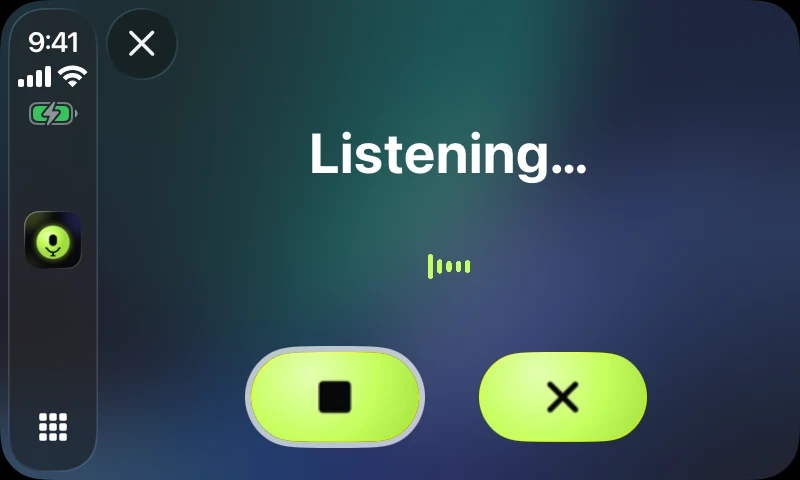
| Start and stop | Tap Record, tap Stop | Opens listening in CarPlay; stops itself after 5 to 60 s of quiet |
| CarPlay | No | Yes, one listening screen |
| Siri commands for notes | None in Apple's Voice Memos guide | Start, stop and delete notes by voice, even with the iPhone locked |
| Transcript languages | 10, on iPhone 12 or later | Nearly 100, detected automatically |
| Summary | By tap, with Writing Tools (Apple Intelligence) | Automatic (Apple Intelligence) |
| To-dos in Reminders | Not built in | Automatic, at the time you said |
| Editing audio | Trim, replace, resume | No audio to edit |
| Sync | iCloud | Your private iCloud |
| Price | Free, built in | Free 10 days, then $9.99 once |
Voice Memos facts: Apple, Make a recording in Voice Memos and View a Voice Memos transcription, checked November 24, 2026. Apple Intelligence needs an iPhone 15 Pro or iPhone 16 or later.
Which is better while driving?
RoadNotes. Voice Memos starts and stops with a tap on the iPhone screen, so it needs your hands and eyes. RoadNotes opens on the CarPlay screen already listening, saves when you go quiet, and says out loud that the note is saved. You can also start it with “Hey Siri, open Road Notes”. The guide to taking notes while driving covers the safe way to do it.
Which gives better transcripts?
For the 10 languages Voice Memos supports, both give you a full transcript. The differences are around it:
- Languages. Voice Memos covers 10. RoadNotes covers nearly 100 and detects the language each time.
- What comes with it. In Voice Memos you can summarize a transcript with a tap, if you have Apple Intelligence. RoadNotes writes the summary and pulls out the to-dos for every note, and can send the to-dos to Apple Reminders.
- Old recordings. Voice Memos can transcribe recordings you already have. RoadNotes only transcribes notes you record in RoadNotes.
More detail in how to turn a voice memo into text on iPhone.
Which one keeps my audio?
Voice Memos. That's its job. RoadNotes deliberately doesn't: it turns speech into text on your iPhone and deletes the recording right after, so the audio never leaves the device. If you need to replay exactly how something was said, record it in Voice Memos. If you only need what was said, RoadNotes keeps the text and can read a note aloud.
What does each cost?
Voice Memos is free and comes with the iPhone. RoadNotes is free for 10 days with every feature, then $9.99 once, for life. There's no subscription, nothing is charged automatically, and your notes stay readable if you don't buy.
Can I use both?
Yes, and many people should. Use Voice Memos for meetings, lectures and music, where the audio matters. Use RoadNotes in the car and for quick thoughts you want turned into a to-do list. They don't conflict.
Frequently asked questions
Is Apple Voice Memos good enough for notes?
For recording, yes: it's free, keeps the audio and adds a transcript in 10 languages on iPhone 12 or later. It's less suited to driving, because you tap to start and stop, and to-dos aren't pulled out for you.
Does Voice Memos work in CarPlay?
Not hands-free: Apple's guide has you start and stop recordings with a tap on the iPhone screen. RoadNotes runs on the CarPlay screen and opens already listening.
Does RoadNotes record audio like Voice Memos?
RoadNotes records while you talk, turns it into text on your iPhone, then deletes the recording. You keep the summary, to-dos and full transcript, not the audio.
Which supports more languages?
RoadNotes transcribes nearly 100 languages. Voice Memos transcribes 10: English, Spanish, Portuguese, Italian, French, German, Japanese, Korean, Simplified Chinese and Traditional Chinese.
Is RoadNotes a subscription?
No. RoadNotes is free for 10 days, then a one-time $9.99 unlocks it for life.
Try RoadNotes free for 10 days
Hands-free voice notes for CarPlay, iPhone and Apple Watch. Then $9.99 once. No subscription, no account.
More guides
Sources
Checked on November 24, 2026. Apple's guides describe the current iOS version and can change.
- Apple, iPhone User Guide: Make a recording in Voice Memos on iPhone
- Apple, iPhone User Guide: View a Voice Memos transcription on iPhone