
Roundup · 2026
The best CarPlay apps for taking notes (2026)
Short answer
Apple's CarPlay guide names Reminders, Clock and Weather as examples of apps Siri can use in the car. Notes and Voice Memos aren't named. So for notes in CarPlay, either dictate reminders to Siri or use a voice notes app made for CarPlay. Apps whose App Store listings describe CarPlay support include RoadNotes, Auto Memo Recorder, Cleft and Spokn.
How this list was made. I make RoadNotes, so it's listed first, and you should weigh that. Every fact about the other apps comes from its own App Store listing, read on November 24, 2026 and linked below. I haven't added ratings or reviews. Apps change, so check the listing before you buy.
What makes a good CarPlay notes app?
- It starts listening without menus. One tap, or one Siri phrase.
- It stops on its own when you go quiet.
- It confirms without a look, by voice or sound.
- It turns speech into text, ideally on the iPhone, so your audio stays private.
- The price fits. A one-time purchase, a subscription or free.
Which CarPlay apps can take notes?
1. RoadNotes: notes you can act on
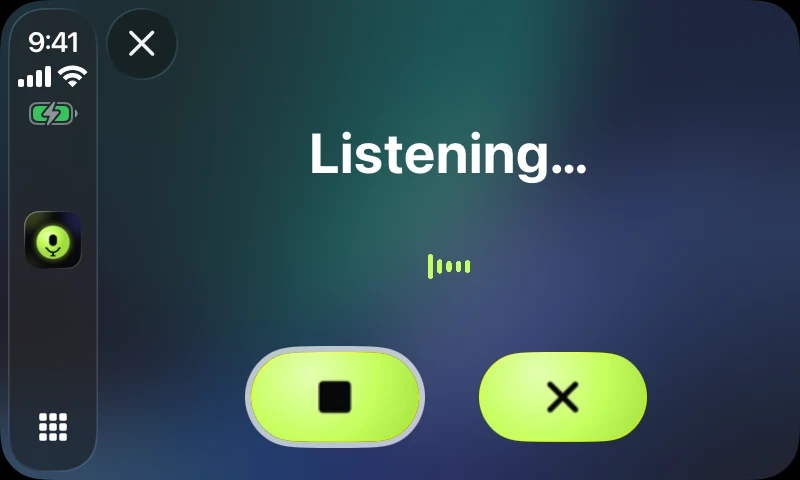
RoadNotes opens on the CarPlay screen already listening, with only Stop and Cancel. It saves the note after 5 to 60 seconds of quiet and says out loud that it's saved. On your iPhone, each note becomes a summary, a to-do list and the full transcript; to-dos can go straight to Apple Reminders. Transcription runs on the iPhone in nearly 100 languages, and the recording is deleted after. It also works on Apple Watch and with Siri, even with the iPhone locked.
Price: free 10-day trial, then $9.99 once. Needs: iOS 26.4. Best for: drivers who want a to-do list, not a pile of audio.
2. Auto Memo Recorder: a hands-free recorder
Its listing describes a hands-free CarPlay mode where you start and stop recordings, and add to an existing one, with voice commands. It mentions configurable silence detection, unlimited recording time, audio quality from 16 kHz to 48 kHz, standalone Apple Watch recording, optional iCloud sync, and transcribing and sharing your memos.
Price: $2.99. Needs: iOS 16.6. Best for: people who want to keep and replay the audio.
3. Cleft: for verbal thinkers
Cleft's listing lists CarPlay for capturing hands-free while driving, along with iPhone, iPad, Mac and Apple Watch. It says transcription happens on the device, works offline, and offers Siri and Shortcuts for searching notes and getting summaries. Cleft Plus adds longer recordings and Notion, Obsidian and Apple Notes integrations.
Price: free to download; Cleft Plus is $6.99 a month or $39.99 a year. Needs: iOS 17. Best for: people who also want their voice notes on a Mac or in Notion.
4. Spokn: clean written notes
Spokn's listing describes a voice-first CarPlay experience. It says transcription and AI cleanup run entirely on the iPhone, with no account, and that it removes filler words and adds paragraphs and lists. You can speak formatting, such as “new paragraph” or “start a numbered list”.
Price: free to download. Needs: iOS 26. Best for: people who want their speech turned into tidy prose.
5. Siri and Reminders: free and built in
No app to install. Hold the voice button on the steering wheel and say “Remind me to…”. Apple lists Reminders among the apps Siri can use with CarPlay. It's great for one-line to-dos and weak for longer thoughts. See how to use Siri to take notes while driving.
How do the CarPlay notes apps compare?
| App | Price | Speech to text | Apple Watch | Summary or to-dos |
|---|---|---|---|---|
| RoadNotes | $9.99 once, after 10-day trial | On the iPhone, ~100 languages | Yes | Summary and to-dos, sent to Reminders |
| Auto Memo Recorder | $2.99 | Yes (listing doesn't say where) | Yes | Not mentioned |
| Cleft | Free; Plus $6.99/mo or $39.99/yr | On the device | Yes | Summaries via Siri and Shortcuts |
| Spokn | Free to download | On the iPhone | Not mentioned | Cleaned-up notes with lists |
| Siri + Reminders | Free | Siri | Not covered here | One reminder per request |
From each app's App Store listing, November 24, 2026. RoadNotes facts from this site.
What about Apple Notes and Voice Memos in CarPlay?
Apple's CarPlay guide names Reminders, Clock and Weather as examples of apps Siri can reach in the car. Notes and Voice Memos aren't named, and you start a voice memo with a tap on the iPhone. Both are still useful before and after a drive. Voice Memos can transcribe recordings in 10 languages; see voice memo to text on iPhone and Voice Memos vs RoadNotes.
Which one should I pick?
- You want a to-do list from your drive: RoadNotes.
- You want to keep the audio: Auto Memo Recorder.
- You want notes on a Mac or in Notion: Cleft.
- You want polished paragraphs: Spokn.
- You only need the odd reminder: Siri, for free.
Whatever you choose, set it up at home and use it by voice only. Our guide to taking notes while driving covers the safety side and the law.
Frequently asked questions
Is there a notes app for CarPlay?
Apple's CarPlay guide names Reminders, Clock and Weather as examples of apps Siri can use in the car, but not Notes. Third-party voice notes apps whose App Store listings describe CarPlay support include RoadNotes, Auto Memo Recorder, Cleft and Spokn.
What is the best CarPlay app for voice notes?
It depends on what you want to keep. RoadNotes turns each note into a summary and to-do list hands-free. Auto Memo Recorder keeps the audio. Cleft syncs to Mac and Notion. Spokn writes tidy paragraphs. For a quick reminder, Siri is free.
Can I take notes in CarPlay for free?
Yes, as reminders: say “Remind me to…” to Siri. Cleft and Spokn are also free to download. RoadNotes is free for 10 days, then $9.99 once.
Which CarPlay notes apps keep my audio private?
RoadNotes, Cleft and Spokn all say on their listings that speech is turned into text on the device. RoadNotes also deletes the recording once the text is ready.
Do these apps work without CarPlay?
Yes. All four also work on iPhone. RoadNotes, Auto Memo Recorder and Cleft also list Apple Watch support.
Try RoadNotes free for 10 days
Hands-free voice notes for CarPlay, iPhone and Apple Watch. Then $9.99 once. No subscription, no account.
More guides
Sources
Checked on November 24, 2026. Apple's guides describe the current iOS version and can change.
- App Store listing: RoadNotes: Voice Notes
- App Store listing: Auto Memo Recorder
- App Store listing: Cleft - For Verbal Thinkers
- App Store listing: Spokn - Voice Notes
- Apple, iPhone User Guide: Use other apps with CarPlay
- Apple, iPhone User Guide: Use Siri in your car on iPhone